Free AI image generator with no sign-up
Describe a picture and get it in seconds. 2 free a day, then edit it or make it move.
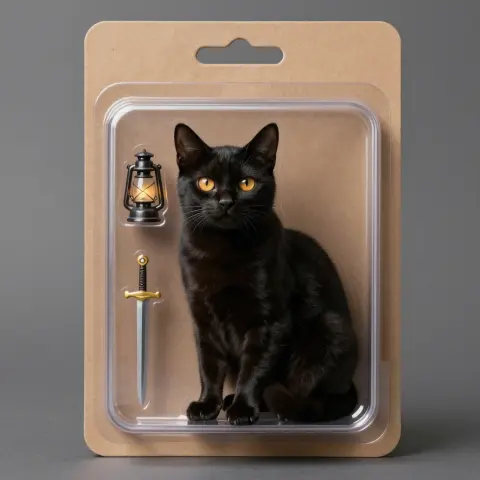 Made from the words below
Made with one sentence
Real results, each with the exact words that made it.
- Make an image“a black cat with amber eyes as a collectible action figure in a blister pack, with a tiny lantern and sword”
- Animate a photo“he steps forward as embers drift past, lifts his head and barks once”
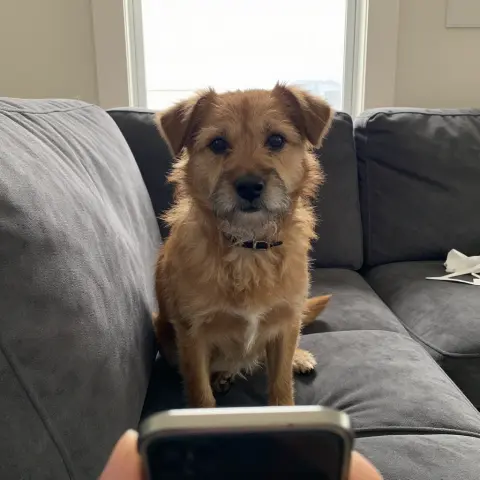
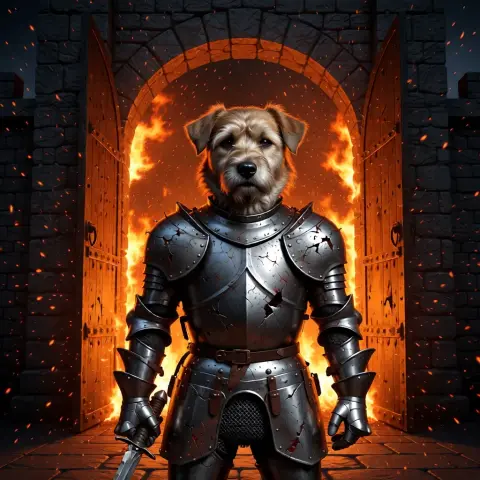 Edit a photo“put this dog in battered knight armour at a burning castle gate; keep his face exactly the same”
- Make a photo talk“You’re still up? Good. Stay with me a while.”
- Restore an old photo“restore and colour it, then: he blinks slowly and smiles”
- Text to video“An old lighthouse keeper climbs the last steps in a storm, opens the door at the top, and a giant wave rises out of the dark sea.”
How it works
- 01Describe the picture
- 02Get it in seconds
- 03Edit it, or make it move
nokeep makes 2 free AI images a day with no account, no email and no card: open the page, describe the picture, and it appears in a few seconds. Editing a photo you upload uses the same 2 free images. After that, an image is 50 credits and an edit 100, where 1,000 credits are one dollar, and every result is saved in your browser rather than on our servers.
On this page
Make a free image in three steps
Step 1: Open nokeep and switch the composer to image. There is no sign-up screen, no email to confirm and no card to enter.
Step 2: Describe one picture. Name the subject, the setting, the light and the style: “a lighthouse on a cliff at dusk, heavy rain, oil painting”. A clear description beats a long one.
Step 3: Generate. The image appears in your chat in a few seconds. Download it, ask for a change in words, or try again with a different description.
What is free, and what costs credits
Every day you get 2 free images, 25 chat messages and 1 short video clip, with no account. The 2 free images cover both new pictures and edits of a photo you upload, so you can make two, edit two, or one of each.
After the free images, a new image is 50 credits, about 5 cents, and an edit is 100 credits, about 10 cents. The composer shows the price before you start. Credits start at $5, which buys about 100 images, and they never expire. The Plus plan at $15 a month covers about 400 images and unlimited chat.
The free allowance resets each day. It is not unlimited, and it is the same for everyone who opens the page without paying.
Edit a photo for free
Attach a photo to the composer and say what to change: “make it snow”, “turn this into a watercolour”, “replace the background with a beach”. The edit counts as one of your 2 free images for the day.
Edits work best when you ask for one change at a time. If the result drifts, start again from the original rather than editing the edit.
Where your images are kept
Your prompts and images are saved in your browser, not on nokeep’s servers. nokeep keeps no gallery of your pictures and does not train on them. The image itself is made on hosted infrastructure that receives your description and any photo you attach, under zero-data-retention terms.
Because the images live in your browser, clearing site data removes them. Download the ones you want to keep. On a shared computer, delete them when you finish.
Limits
Images of minors, sexual or misleading images of real people, and illegal content are always blocked.
Text inside a picture is often misspelled, hands can come out wrong, and the same description gives a different image each time. Expect to try a few times for a picture you are happy with.
Sources
Step by step in nokeep
Asked before you asked
Is it really free with no sign-up?
Yes. 2 images a day are free with no account, no email and no card. After that, images use credits.
Can I edit my own photo for free?
Yes. An edit of a photo you upload counts as one of your 2 free images for the day.
How much does an image cost after the free ones?
50 credits for a new image and 100 for an edit, where 1,000 credits are one dollar. Credits start at $5 and never expire.
Can I use the images I make?
Yes. Download them and use them as you would any image you made, within the terms. Do not use them to mislead people about a real person.
Where are my images stored?
In your browser. nokeep keeps no copy on its servers. Download what you want to keep before clearing site data.