Edit a photo by saying what to change
Add a photo and say what to change. Back in seconds, 2 free a day, no account.
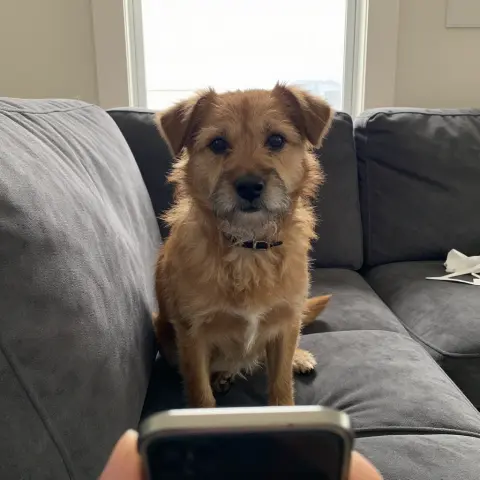
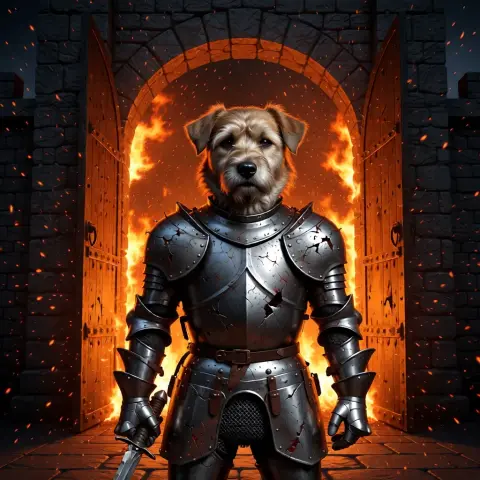 BeforeAfter
Made with one sentence
Real results, each with the exact words that made it.
- Edit a photo“put this dog in battered knight armour at a burning castle gate; keep his face exactly the same”
- Animate a photo“he steps forward as embers drift past, lifts his head and barks once”
- Make a photo talk“You’re still up? Good. Stay with me a while.”
- Restore an old photo“restore and colour it, then: he blinks slowly and smiles”
- Text to video“An old lighthouse keeper climbs the last steps in a storm, opens the door at the top, and a giant wave rises out of the dark sea.”
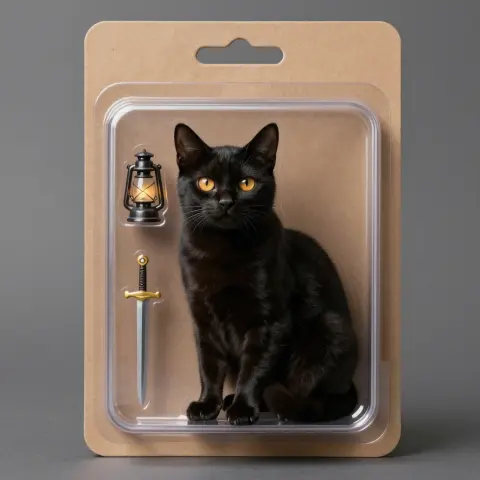 Make an image“a black cat with amber eyes as a collectible action figure in a blister pack, with a tiny lantern and sword”
How it works
- 01Add a photo
- 02Say what changes and what stays
- 03Edit again, or make it move
Add a photo, say what should change and what should stay, and nokeep returns the edited picture in a few seconds. Edits share the 2 free pictures a day, with no account, no email and no card; after that an edit is 100 credits, about 10 cents. When it looks right, make it move.
On this page
How it works
Step 1: Add the photo you want to change.
Step 2: Write the change as two halves: what changes, and what stays. “Put him in a tuxedo at a rooftop party at night; keep his face and pose exactly the same” gives the editor a clear brief. “Make it better” gives it nothing.
Step 3: Open it in nokeep and send. The edited picture appears next to the original in a few seconds. Change it again, go back to the original, or turn the result into a clip.
What edits work well
Changes you can say in one line: a new background, a different outfit, another decade, new light such as golden hour or neon at night, a change of season or weather, an object added or taken out, or a style such as oil painting or film photo.
One change per edit works best. A new background, new lighting and a new outfit work better as three edits than as one long request. Name what must not change, because details you do not mention are the ones that drift.
From an edit to a clip
Every edited picture can become the first frame of a video. Keep the edit you like and describe what happens next: “he steps forward and the cape catches the wind”. A five-second clip is 480 credits, about 48 cents, with sound.
What is free, and what an edit costs
Every day you get 2 free pictures with no account; an edit counts as one. After that, an edit is 100 credits, about 10 cents. Credits start at $5, never expire and need no subscription. If an edit fails to render, it is not charged.
Whose photos you can edit, and what happens to them
Edit photos you took, pictures you made, and images whose licence allows changes. A photo of another person needs their permission. Sexual or misleading edits of a real person and anything involving minors are always refused, and they break nokeep’s terms.
Your photo and the result are saved in your browser, not on nokeep’s servers. To make the edit, the photo and your words are processed under zero-data-retention terms; nokeep keeps no copy and does not train on your pictures.
Limits: small changes usually keep a face the same, large ones may return someone who only resembles the original, and results come back at about 1K.
Sources
Asked before you asked
Is the photo editor free?
Edits share the 2 free pictures a day, with no account. After that an edit is 100 credits, about 10 cents.
Can I turn the edited photo into a video?
Yes. Use the edit as the first frame of a clip and describe the motion. A five-second clip is 480 credits.
Do I need to sign up?
No. There is no account, no email and nothing to install.
Can I edit photos of other people?
Only with their permission, and never into sexual or misleading imagery. Those edits are always refused.
Does nokeep keep my photos?
No. The photo and the result are saved in your browser; the editing service processes them under zero-data-retention terms.